Share Basket
|
Allow your customers to easily share their current basket with other folk
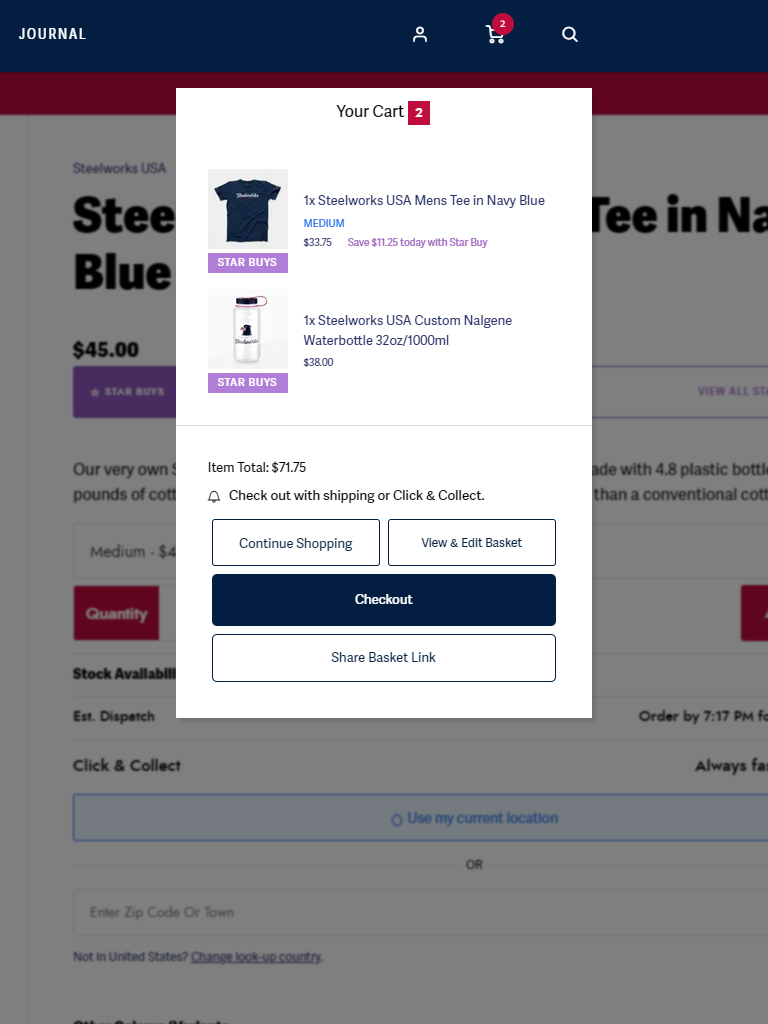
Share with friends and family (or even yourself)
Whether it is sharing a basket with friends and family or with yourself for picking up the order on a different device later, sharing a basket can be a useful little tool.
Share exactly the right things
Most share features create links to the item, but not the specific SKU. With Share Basket, you can be sure that the items you are sharing are in the correct size. Helpful for the friends or family members receiving the link.
Why share a basket to yourself?
If you’ve been shopping on a desktop device (let’s not say “shopping at work”), it’s often a PC. So, if you want to pay with mobile payments like Apple Pay, it can be useful to pivot to your smartphone. But that means going through the process of adding all the items to the basket again. With Share Basket, you can send yourself a link to the existing basket and see it recreate on your preferred device for checkout
Bonus Bit
Alongside Share Basket, we’ve also included a “View & Edit Basket” button to the Mini-Basket. It does exactly what “Checkout” does (which is take the customer to the full basket), but it addresses a different user intention, which is to help guide them towards editing their basket or gathering other useful information before beginning checkout.
You don’t have to have this, but we recommend it.
Get a demo
If you’re interested in Share Basket for your business, speak to the Success Team or jump on Live Chat and make enquiries.

Let’s Talk
Call anytime Monday to Friday between 09:00 and 17:00 to speak to one of our friendly retail experts.
or send us an email at [email protected]