If you’ve ever wished the Workshop Calendar made it easier to spot job status, or that you could send service comms from a dedicated email address, you’re not the only one. We’ve been working hard behind the scenes to make a dent in the most-requested new features shared over on Canny.
For anyone who may not know, Canny is our public feedback board where Cloud POS users can post suggestions, comment on other user ideas, and vote for the system improvements that would have the biggest impact on the day to day of running a bike shop repair and service center.
On the Workshop board alone, there were more than 140 great ideas shared by the community, so we’ve spent the last few months grouping them by theme and bringing the best and most-requested of them into the module.
We’ve zoned in on changes that will help streamline the little tasks that you do every single day. The seconds saved by a right click here, or a color-coded view there, add up over the week. This new release brings faster daily workflows, better ‘at-a-glance’ information and more control over how the module works in your shop.
Here’s some of the biggest improvements coming to Workshop on 18 August.
Calendar and Board: spot what matters faster
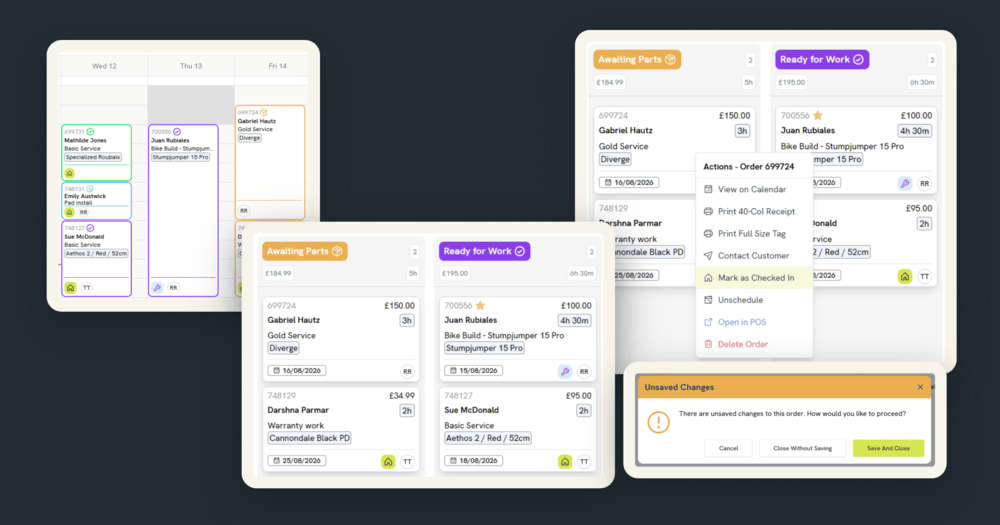
Appointment blocks on the Calendar now use border color to show job status, not just whether something’s overdue. We’ve made the borders thicker too, so you can see the different colors easily.

Any jobs marked ‘Important’ will now move straight to the top of their Board column instead of getting buried in a long list. The Board can be sorted by date created, so you can quickly spot old jobs still waiting on attention.

We’ve made scrolling across a wide Board smoother, and filtering the Calendar by order status now has options for ‘select all’, ‘clear all’, and ‘none’, instead of clicking through statuses one at a time.
A single all-day checkbox replaces setting holiday start and end times by hand, and you can now add staff holidays directly from the Calendar view instead of jumping to a separate tab. There’s also a new ‘all mechanics’ button on both Board and Calendar, so you can see your whole team’s schedule in one click.

Communications: keeping workshop and service conversations where they belong
You can now set up a separate email address just for workshop communications, if you’d prefer replies not to land in the same inbox as general customer service. Message notifications will show up on open job cards the moment a reply comes in, which means mechanics won’t miss new messages while they’re working on the bike.

Booking date and time placeholders are now available in your messaging templates, and adding an image to a job note is now a single click rather than something buried inside Customer Communications.
Job cards: working faster, without losing progress
Staff can now mark a job as checked in or not checked in straight from the right-click menu, without needing to open the job card at all. Shops running shared logins can see who created a job by name through a new Sales Rep field, and you’ll now be able to open the related Workshop job directly from the Goods In Actions menu.


Service reminder scheduling has moved from buttons to a drop-down that remembers your last choice, and mechanics can now select multiple items at once when adding them to a job.
Ever accidentally lost work when navigating away via the Back Office menu? Now, if you try to navigate away from a job with unsaved changes, you’ll get a prompt first. Plus, looking up an item from a job card now opens the item record in a new tab, so checking details won’t risk losing unsaved changes.

More to come!
The full list of changes will be shared in the release notes when everything goes live on August 18, so stay tuned for those. In the meantime, please keep adding your feedback and ideas to Canny, and voting for the changes that will make life easier for your bike shop – there’s more Workshop updates to come in October. We’re always listening, and it really helps shape what gets built next.