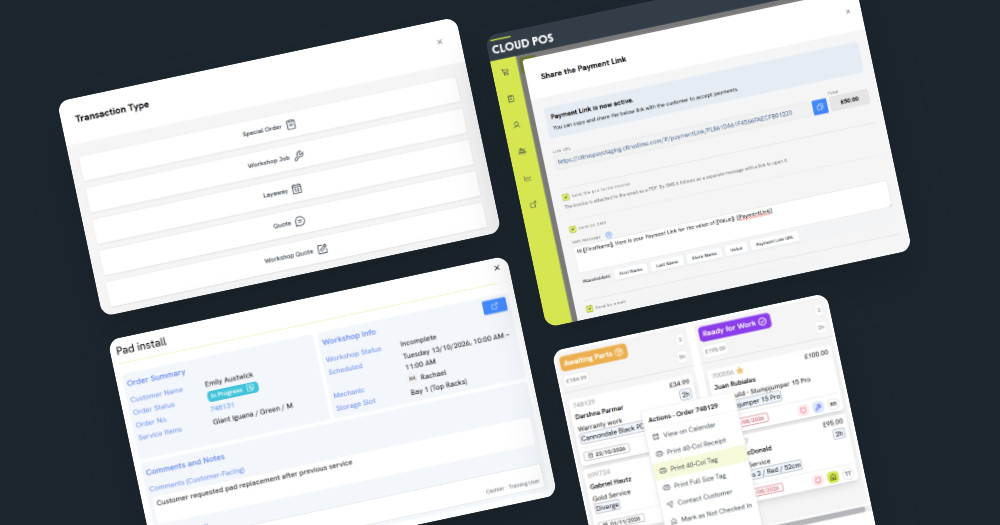
Picking up where August’s Workshop update left off, the latest changes we’ve made to Cloud POS include several new features mentioned by customers over on our feedback forum.
In a continued effort to streamline your workflows and speed up day-to-day tasks, we’ve added a new order type to the Workshop module, along with improvements to invoicing, Purchase Orders and the Point of Sale.
Here’s a full look at what’s new in Cloud POS from October 19.
New Workshop order type: create and convert Quotes


This update introduces Workshop Quotes; a new order type that happens before a job is confirmed. They sit directly within Cloud POS Workshop, so mechanics can manage and schedule them alongside the rest of their daily workload.
Like standard Quotes, they won’t commit any stock for ordering purposes, but they’re easily convertible into a Workshop Job when the time comes. If plans change, you can convert them right back again.
This was a requested feature from the feedback forum, so we’re excited to see it have a meaningful impact in your service and repair centers.
More Workshop improvements, shaped by your feedback
On the topic of requested features, here are a few more improvements you’ve been asking for…

A new ‘Workshop Info’ pop-up has been added to the Point of Sale, so sales staff can quickly view everything they need to know about a job, including scheduling times and statuses. Whether you have a customer on the phone or waiting in front of you, any member of staff should be able to confidently provide an update on how their bike is getting on.

The Board view now refreshes automatically, so you can be sure you’re always looking at the latest information. The jobs list on the Calendar view also has improved filters, which make scheduling and reviewing jobs easier, especially for workshop managers.
There’s a new 40-column version of the Workshop Tag that gives a stripped-back summary of each job, for easier tagging of bikes and parts. It shows the customer’s surname big and bold at the top, so you can spot what you want at a glance. We rolled this out to the full-size Tag too, making the surname big, bold and impossible to miss.

If you haven’t spotted it yet, there’s also a new Serviced Items Report in Cloud Reports to help you identify opportunities for repeat service revenue.
Making invoicing and customer order flows easier
When a customer has a question about their order, it helps if they know exactly who to ask. Sales Reps are now much more visible across Cloud POS. Their name and email address appear on full-size documents, and their name shows on order grids, which filter automatically when a Sales Rep has been set. You can also choose to send emails from the Sales Rep or the Cashier instead of the Store. Little changes that give your communications the personal touch that customers expect from an independent store.
You can now send a Payment Link by email as well as SMS, straight from the Point of Sale, with the option to attach the invoice. Your customer gets everything they need in one go, and you’re more likely to see that order paid sooner.

Texting your shop has become easier for customers too. Cloud POS can now receive messages from numbers you haven’t contacted before, so a new customer can text in with a question and it’ll come straight through. If you’d like customers to be able to text your store landline, our Support Team can map that number to Cloud POS, so those messages arrive in the same place.
On the paperwork side, full-size invoices for Businesses now show pricing excluding tax automatically. Receipts can also be sent by SMS at the end of any transaction, for customers who prefer this option to email.
More visibility, improved reconciliation with CitrusPay
CitrusPay Fee Statements are now available to download each month, giving you a clear record of your fees. You’ll also receive email notifications for any disputes or chargebacks, so you can respond to them quickly.
Refunds made on a CitrusPay terminal now show on the X/Z report for the till that processed the refund, rather than the till that took the original sale. This makes reconciling CitrusPay refunds at the end of the day much more straightforward.
Other notable mentions
Alongside the bigger changes, we’ve made a few improvements that should make everyday tasks run a little more smoothly.
If you run more than one store, you can now copy Purchase Orders and Transfers across to your other stores, so there’s no need to build the same order from scratch each time. Over at the till, you can scan a receipt at the start of a return to process it more quickly. And following another request from the feedback forum, you can now view the X/Z Report on screen without printing it.
You’ll also notice a change when we release updates. The pop-up asking you to refresh the page is gone. Instead, Cloud POS refreshes itself and leaves a small notification in the corner of your screen to let you know.
Help shape the next update
You’ll find full details of every change in the release notes. In the meantime, please keep sharing your ideas on our feedback forum and voting for the changes that would make the biggest difference to your shop.